

On this page
Updated for 2026: This guide has been refreshed with updated YouTube creator tips, beginner tools, and practical advice for starting a YouTube channel today.
Starting a YouTube channel can feel overwhelming at first. With millions of videos uploaded every day, many beginners wonder where to start and how to create content that people actually want to watch.
The good news is that you don’t need expensive equipment or a professional studio to begin. Many successful creators started with simple ideas, basic cameras, and a willingness to learn as they went.
If you’ve been thinking about starting a channel, these five steps to make a YouTube video will help you plan, create, and publish your first video with confidence.
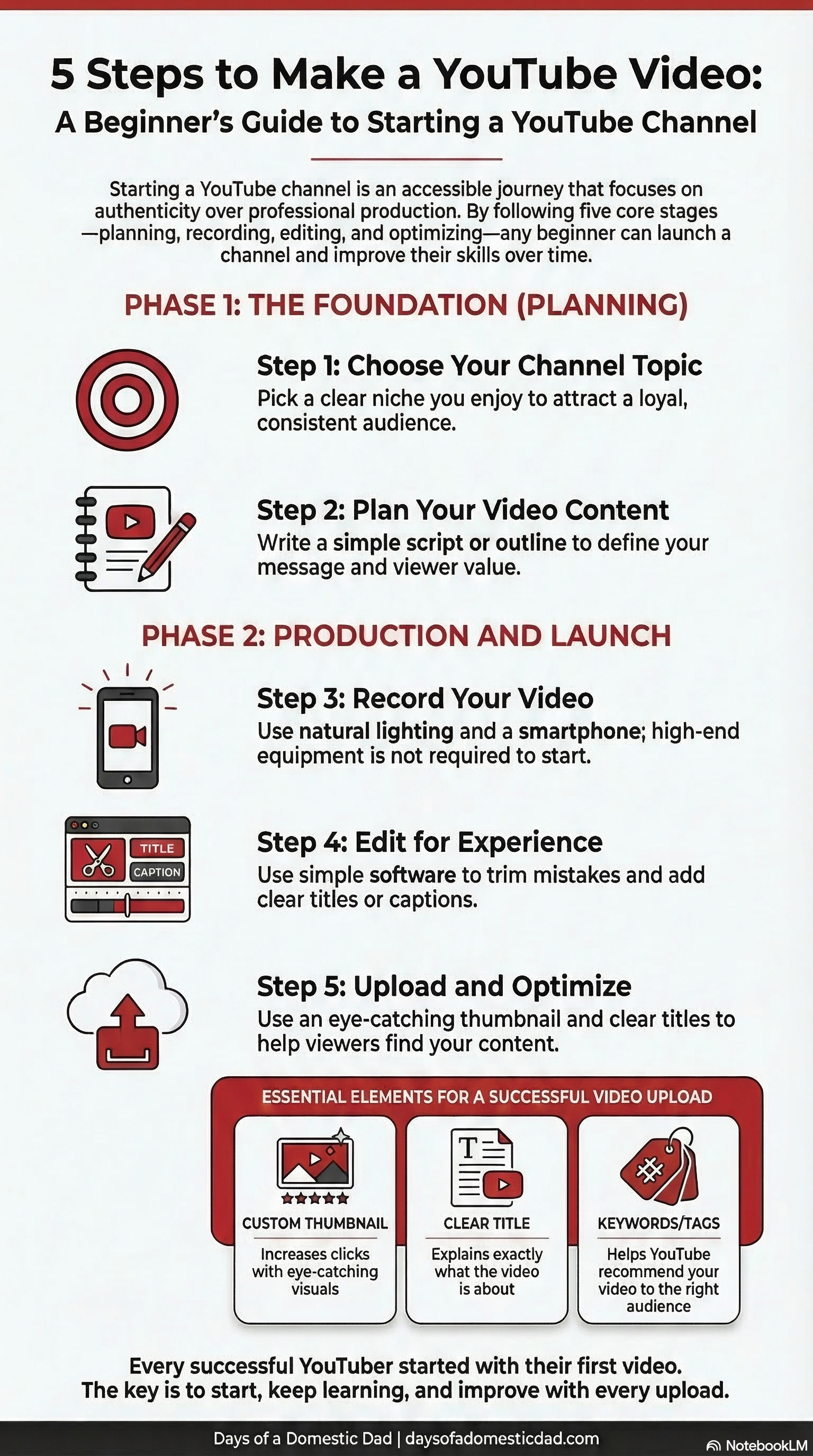
Step 1: Choose Your Channel Topic and Audience
Before recording anything, decide what your channel will focus on. Successful YouTube creators usually stick to a clear theme so viewers know what to expect.
Ask yourself:
- What topics am I passionate about?
- What knowledge or experiences can I share?
- Who is my target audience?
Your channel might focus on things like:
- family life
- parenting tips
- gaming
- technology reviews
- tutorials
- travel
- DIY projects
Choosing a niche helps you attract viewers who are interested in your content and increases the chances of building a loyal audience.
Step 2: Plan Your Video Content
Even simple YouTube videos benefit from a little planning. Before recording, outline what you want to say and how the video will flow.
A basic plan might include:
- A short introduction
- The main topic or story
- Key tips or demonstrations
- A summary or closing message
Planning helps you stay on track and reduces the amount of editing needed later.
Many creators also research what people are searching for on YouTube so they can make videos that answer common questions.
Step 3: Record Your Video
Once you have your idea and plan ready, it’s time to start recording.
You don’t need professional equipment when you’re starting out with Youtube videos. Many beginners successfully record videos using:
- smartphones
- webcams
- entry-level cameras
A few tips for better video quality:
- Record in a well-lit space
- Use a quiet environment
- Position the camera at eye level
- Speak clearly and naturally
Remember that viewers care more about helpful content and authenticity than perfect production quality.
Step 4: Edit Your Video
Editing helps turn your raw footage into a polished video that viewers enjoy watching.
Basic editing tasks include:
- trimming mistakes
- adding music
- including titles or captions
- adjusting sound levels
Beginner-friendly editing software includes:
- iMovie
- CapCut
- Adobe Premiere Rush
- DaVinci Resolve
You don’t need complex edits when starting out. Focus on keeping your video clear, easy to follow, and engaging.
Step 5: Upload and Optimize Your Video
After editing your video, it’s time to upload it to YouTube.
When uploading, pay attention to the following elements:
Title
Your title should clearly explain what the video is about.
Example:
“5 Steps to Make a YouTube Video for Beginners”
Description
Use the description to provide more information about your video and include relevant keywords.
Thumbnail
A clear and eye-catching thumbnail can greatly increase clicks.
Tags and Keywords
Adding relevant keywords helps YouTube understand your content and recommend it to viewers.
YouTube Tips for First-Time Creators
Starting a YouTube channel is a learning process. Don’t worry if your first videos aren’t perfect.
Some helpful tips include:
- Be consistent with uploads
- Focus on helping or entertaining viewers
- Learn from audience feedback
- Improve a little with every video
Many successful YouTubers built their channels slowly by consistently posting content and improving their skills over time.
Common Beginner Questions About Starting a YouTube Channel
Do I need expensive equipment to start a YouTube channel?
No. Many creators start with a smartphone and basic editing software. As your channel grows, you can invest in better equipment if needed.
How long should a beginner YouTube video be?
There is no perfect length, but many beginner videos range between 5–10 minutes depending on the topic.
How often should I upload videos?
Consistency matters more than frequency. Posting once a week or twice a month can help build momentum while maintaining quality.
Final Thoughts
Starting a YouTube channel may feel intimidating, but the process becomes easier with practice. By choosing a clear topic, planning your videos, and focusing on helpful content, you can gradually build a channel that connects with viewers.
Every successful creator started with their first video, and yours could be the beginning of something exciting.